How to Create Passport Photos at Home for Free
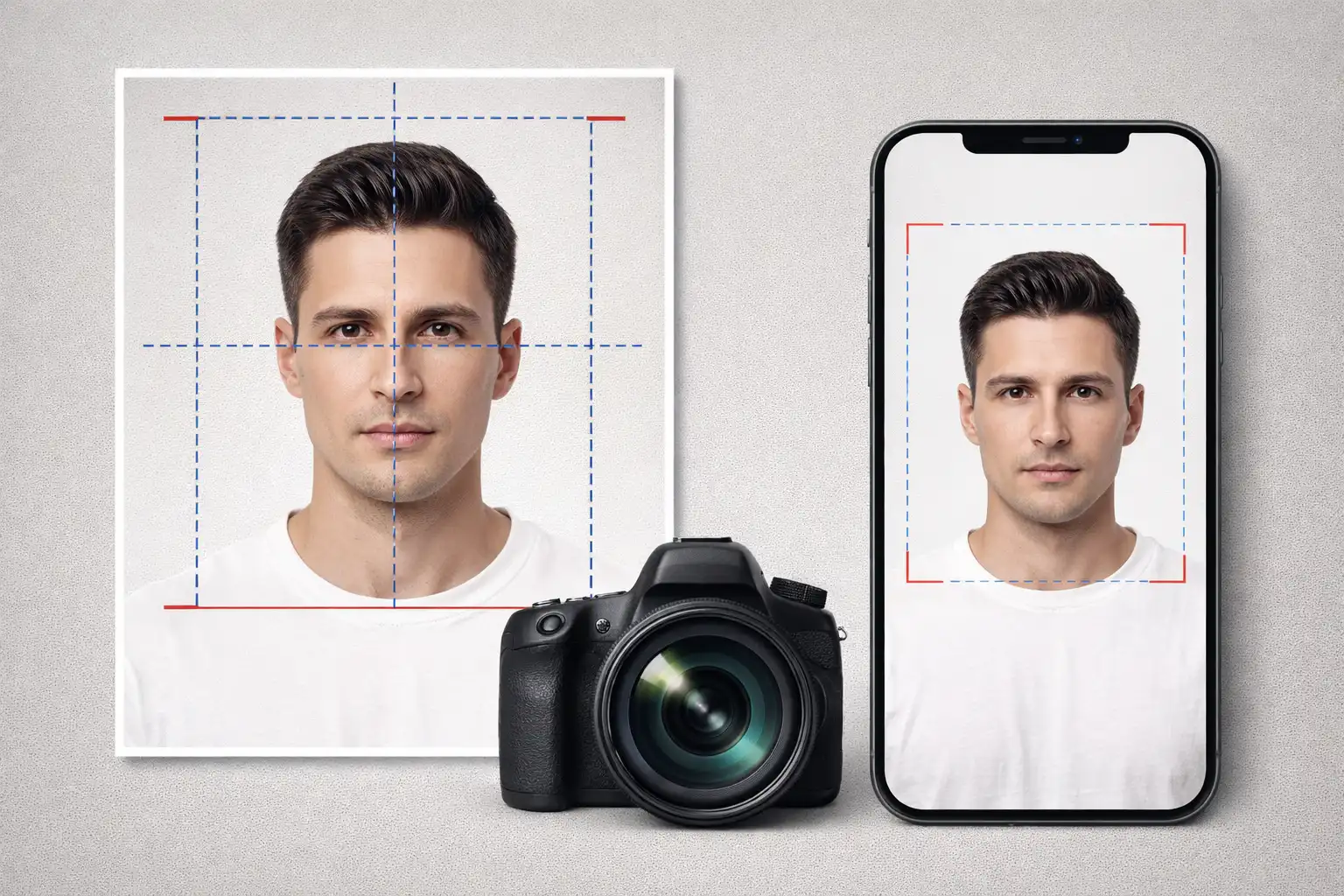
Table of Contents
Getting a passport photo taken at a pharmacy or photo studio typically costs between $10 and $20 for a few small prints. If the photo gets rejected because of a minor issue like wrong dimensions or too much shadow, you pay again. With a smartphone and a browser-based tool, you can create perfect passport photos at home for free, with unlimited retakes until you get it right.
1. Why Make Passport Photos at Home?
There are compelling reasons to create passport photos yourself:
- Cost savings: Professional passport photos cost $10-20 per session. At home, you can take and retake as many photos as needed for free.
- Convenience: No need to drive to a store or wait in line. Create photos anytime, including late at night when you realize your passport expires next week.
- Unlimited retakes: At a store, you typically get one or two attempts. At home, you can take dozens of photos and choose the best one.
- Multiple countries: If you need photos for passports, visas, and ID cards from different countries (each with different size requirements), doing it at home saves multiple trips.
- Privacy: Your face is biometric data. When a store takes your photo, it may be stored on their systems. A client-side tool keeps your photos entirely on your device.
2. Common Passport Photo Requirements
Different countries have specific size and format requirements for passport photos. Here are the most common standards:
United States: 2x2 inches (51x51mm). Head must be between 25-35mm from chin to top of hair. White background. Taken within the last 6 months.
United Kingdom: 35x45mm. Head must fill 29-34mm of the frame height. Light grey or cream background.
India: 2x2 inches (51x51mm) for passport. 35x45mm for some visa applications. White background. 80% face coverage.
Schengen/EU: 35x45mm. Face must cover 70-80% of the frame. Light background (white, light grey, or light blue depending on country).
Canada: 50x70mm. Face must be 31-36mm from chin to crown. White or light-colored background.
Universal requirements across most countries include:
- Face clearly visible with neutral expression
- Both eyes open and looking directly at the camera
- No glasses (most countries have banned glasses in passport photos since 2016)
- Uniform lighting with no harsh shadows
- Plain, light-colored background
- Recent photo (typically within 6 months)
- High resolution (at least 600 DPI for prints)
3. How to Take a Good Passport Photo
You do not need professional equipment. A modern smartphone camera is more than sufficient. Follow these guidelines:
Background: Stand in front of a plain white or light-colored wall. If you do not have a suitable wall, hang a white bed sheet. Avoid backgrounds with patterns, shadows, or visible texture.
Lighting: Use natural daylight from a window. Position yourself facing the window so your face is evenly lit. Avoid direct sunlight (creates harsh shadows) and avoid overhead-only lighting (creates shadows under the eyes and nose). If natural light is insufficient, use two lamps positioned at 45-degree angles on either side.
Camera position: Place the camera at eye level. Use the rear camera (not the selfie camera) for higher quality. Use a timer or ask someone to take the photo. The camera should be approximately 1-2 meters from your face.
Your appearance: Look directly at the camera with a neutral expression. Keep your mouth closed. Do not tilt or turn your head. Ensure your hair does not cover your face or eyes. Remove glasses unless medically required.
Use portrait mode on your smartphone but disable any beauty filters or skin smoothing. Passport authorities may reject heavily filtered photos. Also ensure the photo is taken at the highest resolution setting your camera supports.
4. Sizing and Cropping for Different Countries
After taking the photo, you need to crop and resize it to the exact dimensions required by your target country. This is where most DIY attempts fail: getting the head size ratio, face position, and exact pixel dimensions correct is critical for acceptance.
Each country specifies not just the overall photo dimensions but also how much of the frame your face should occupy. For example, a US passport photo requires the head (from chin to top of hair) to be between 25mm and 35mm in a 51mm-tall photo. Getting this ratio wrong is the most common reason for passport photo rejection.
Manual cropping in a photo editor is possible but tedious and error-prone. Browser-based passport photo tools automate this process by providing country-specific templates with guide overlays that show exactly where your face, eyes, and chin should be positioned.
5. Using Browser-Based Passport Photo Tools
Passport Photo Maker by ZeroDataUpload simplifies the entire process:
- Select your country from 70+ supported countries. The tool automatically sets the correct photo dimensions, face-to-frame ratio, and background requirements.
- Upload your photo. The photo stays in your browser and is never uploaded to any server. This is especially important for identity photos, which are sensitive biometric data.
- Adjust the crop. The tool provides a template overlay showing exactly where your face should be positioned. Drag and resize to fit the guidelines.
- Download the result. Get a print-ready file at the correct DPI, sized for standard photo paper (4x6 inches) with multiple passport photos arranged for efficient printing.
The entire process takes about 2 minutes and costs nothing. Because everything is processed in your browser, your face photo never leaves your device.
6. Printing Your Passport Photos
Once you have the digital passport photo file, you need to print it. Here are your options:
- Home printer: Use glossy or matte photo paper. Print at the highest quality setting. Ensure the printer driver is set to "actual size" (not "fit to page"). A good inkjet printer produces acceptable results.
- Photo kiosk: Many pharmacies and retail stores have self-service photo printing kiosks. Print a 4x6 inch photo containing multiple passport photos for about $0.30-0.50.
- Online print services: Services like Shutterfly, Walgreens, or local print shops can print your photo file. This option costs more but may produce higher quality results.
After printing, cut the individual photos using a sharp paper cutter or scissors and a ruler. Leave a small border around each photo if required by your country's specifications.
7. Privacy Warning: Why Upload-Based Tools Are Risky
Many online passport photo tools require you to upload your face photo to their server. This is a significant privacy concern. Your face is biometric data. Combined with the fact that you are creating a passport photo, it reveals that you are planning international travel. This information has value to data brokers, advertisers, and potentially malicious actors.
Always prefer client-side tools that process your photo in your browser without uploading it. You can verify this by checking the Network tab in your browser's developer tools. If no outgoing requests contain image data, the tool is genuinely processing locally.
8. Conclusion
Creating passport photos at home is simpler than most people think. A smartphone, decent lighting, and a browser-based sizing tool are all you need. The result is free, instant, and private, with unlimited retakes until you get the perfect shot.
For your next passport renewal, visa application, or ID card, save yourself the trip to the photo studio and the $15-20 fee. Your smartphone camera is more than good enough, and tools like Passport Photo Maker handle the tricky part of getting the dimensions exactly right.
Related Articles

Published: February 18, 2026